





Table of contents
Editor's note:
Overview
Building a robust, cross-border pan-African payment system requires a strict separation of concerns, secure transaction initiation, proper payment rail routing, asynchronous webhook handling, and guaranteed settlement mechanics, whether it be instant or T+x.
As a payment service provider (PSP) operating multiple payment rails - cards, bank transfers and mobile money payments across multiple African markets like Nigeria, South Africa, Ghana, Kenya, Cameroon, Cote D’Ivoire, Egypt and Tanzania, Kora leverages a highly decoupled, API-driven and checkout flows for her payment infrastructure.
This article would be divided into two major sections, namely:
- Payins flow.
- Settlement flow.
Payins flow
This is referred to as collections, where the customer is debited and the merchant is credited.
This section involves the integration and processing payments through Kora, covering everything from the transaction initialization stage to the webhook handling process.
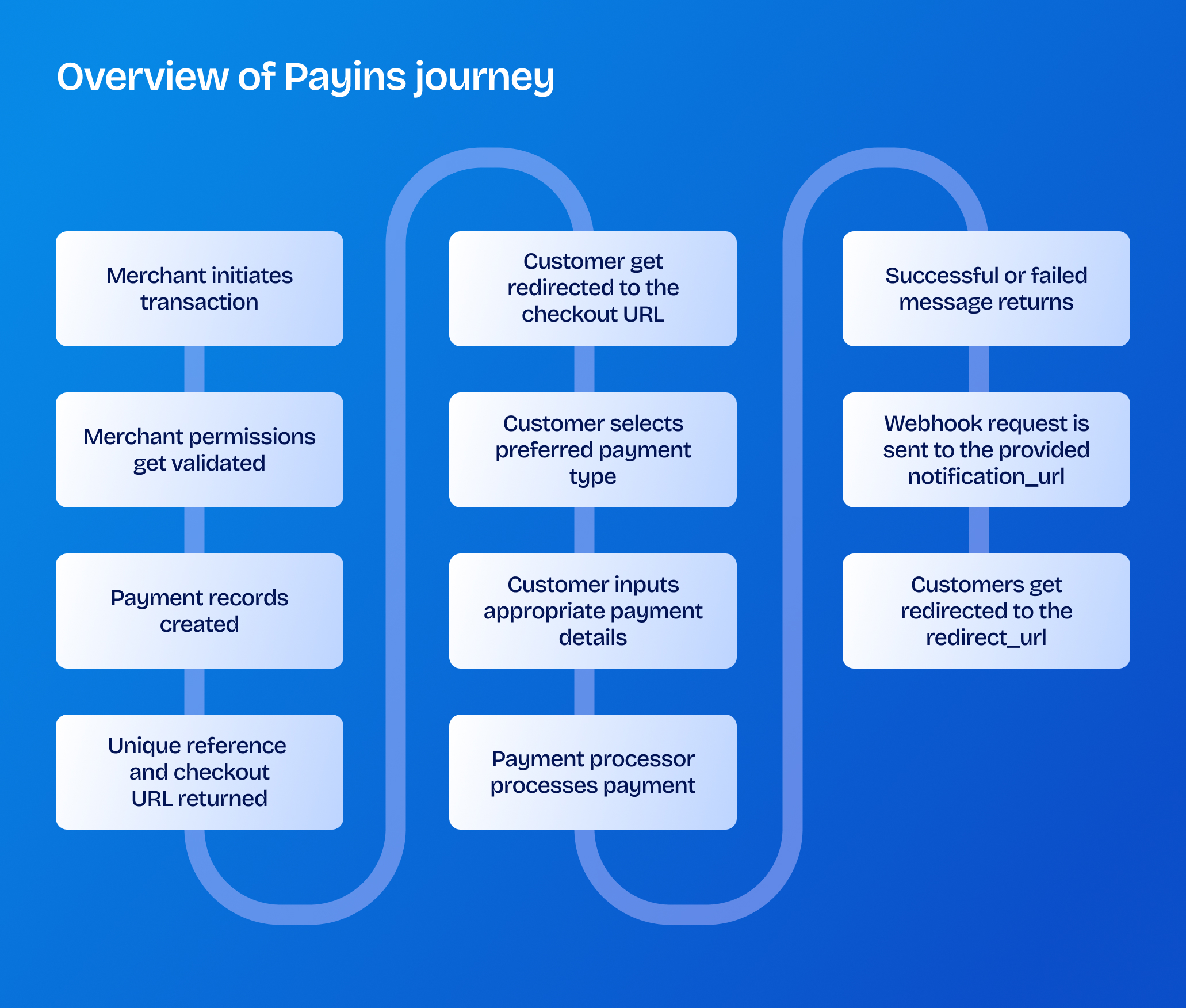
Every payment collection goes through the following processes:
- Transaction initialization.
- Transaction Attempt & Payment Processors Routing.
- Asynchronous Webhook Processing
1. Transaction initialization
Kora provides a simplified API for merchants to make collections seamless which saves development time and comes with also comes with a redirect functionality.
When a customer clicks "Pay" on the merchant application, the payin initialization POST endpoint is called - /v1/charges/initialize
We perform merchant validations and fraud checks before we proceed to create payment records for the transaction with a pending status and then return a generated unique reference and a checkout URL for the customer.
Highlighted below is a sample request body:
{
    "amount": 100,
    "narration": "Payment description",
    "currency": "XAF",
    "notification_url": "https://webhook.site/123456",
    "reference": "new-ref-001",
    "channels": [
       "card",
       "mobile_money",
       "bank_transfer"
    ],
    "redirect_url": "https://www.google.com",
    "customer": {
        "name": "John Doe",
        "email": "johndoe@sample.com"
    }
}
Highlighted below is a sample response:
{
     "status": true,
     "message": "Charge created successfully",
     "data": {
          "reference": "new-ref-001",
          "checkout_url": "https://checkout.korapay.com/KPY-PI-123456/pay"
    }
}
The customer gets redirected to the checkout URL or the URL is loaded inside a merchant defined iframe.
2. Transaction attempt & payment processors routing
After the customer is redirected to the checkout URL, the customer is presented with all the available payment channels for the initiated payment currency.
Highlighted below is a brief description of the available payment channels and their execution flow:
Once the preferred payment channel is selected, the customer is prompted to enter the required payment details and the payment is routed through the appropriate payment processors.
At this point, the payment status would be updated processing
Upon successful payment completion, the customer is redirected to the redirect_url provided during the payment initiation and webhook notification is sent.
3. Asynchronous webhook processing
Because local payment rails across Africa frequently suffer from varying latencies (especially mobile money and regional bank transfers), relying on a synchronous API response to fulfill an order introduces massive risk.
Step 1. Webhook acknowledgement
Webhook notifications allows Kora's servers to instantly alerts the merchant backend server after a payment is completed.
When a successful or failed payment is confirmed, Kora fires an asynchronous POST request to the notification_url configured during the payment initialization.
The merchant is expected to respond with an acknowledgement once the webhook is received.
Highlighted below is a sample successful webhook request
{
  "event":  "charge.success"
  "data": {
    "reference": "KPY-PAY-001",
    "currency": "NGN",
    "amount": 100000,
    "fee": 1075,
    "status": "success",
    "payment_method": "bank_transfer",
    "payment_reference": "new-ref-001"
  }
}
Step 2: Webhook validation
To prevent fraud and system failures during webhook handling, the merchant backend should enforce these validation approaches:
- Cryptographic Signature Verification: Kora appends an
X-Kora-Signatureheader to notifications. The signature is a HMAC SHA256 hash of the request payload, signed using the merchant'sSecret Key. Your code must compute the expected hash and discard mismatches. - Idempotency Safeguards: Network retries can cause the same webhook payload to hit your server multiple times. The merchant backend must check if the
referencehas already been processed assuccessin its database before modifying state or provisioning value. - Transaction Verification (The Double-Check Pattern): Before fulfilling the order, make an explicit server-side
GETcall back to Kora verification charge endpoint to double-check the transaction status before modifying state or provisioning value.
Once the webhook has been successfully handled, the payment status is either updated to success or failed depending on the status of the transaction and the merchant’s collection wallet is credited in case of a successful transaction.
A successful webhook handling process marks the end of the payins flow and this brings us to the next flow: settlement.
Settlement flow
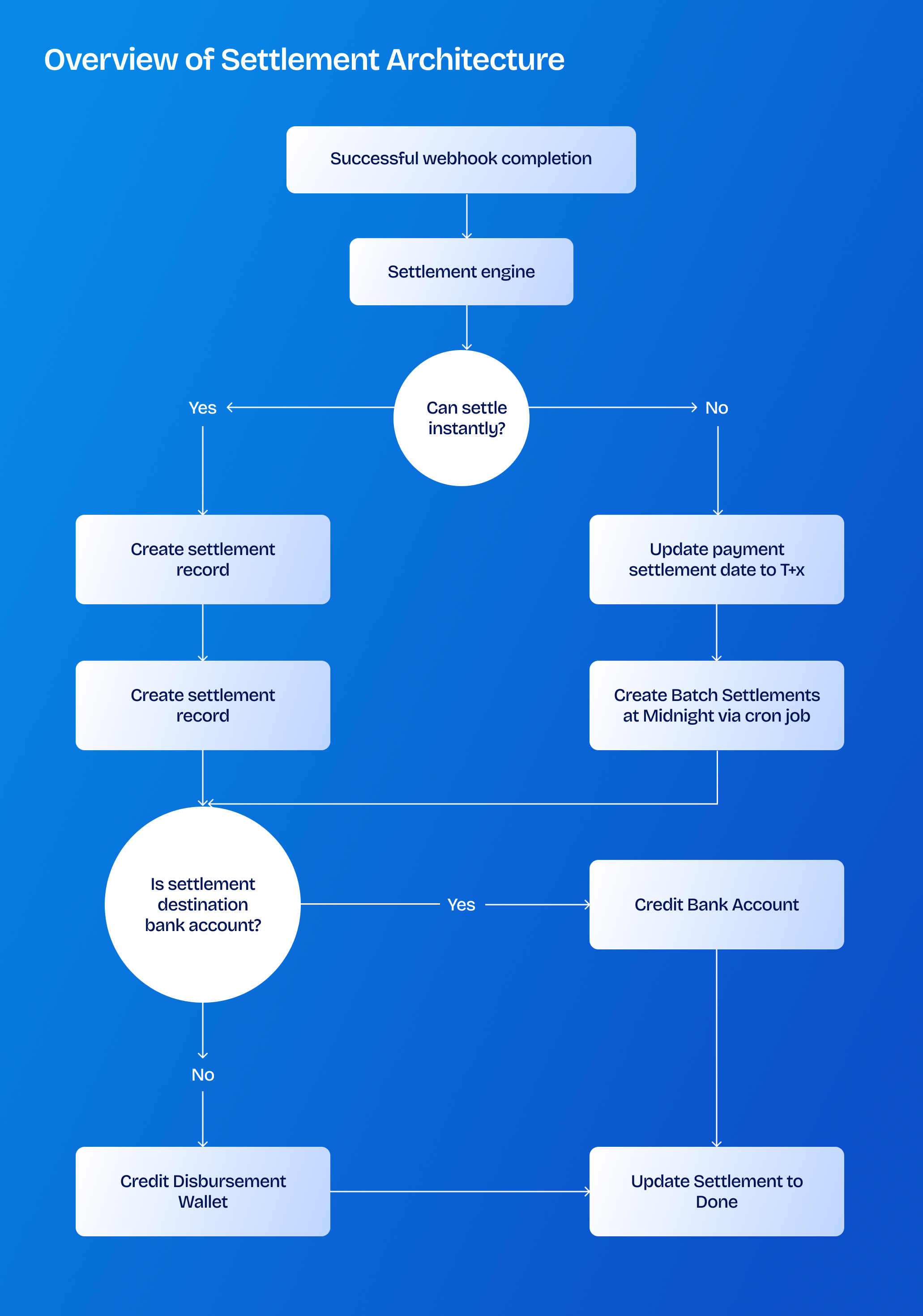
To complete the technical lifecycle of the Kora payment flow, the payment must transition from collections to settlement. Settlement is where the collected money credits the merchant disbursement wallets or bank account.
Settlement mode
Depending on the type of collection, the mode of a settlement may differ. The modes may be either instant or next-day.
If the merchant’s collection type is set to instant settlement, you would be settled immediately in your settlement destination after the collection process is completed.
If the merchant’s collection is set to next-day settlement, a cron job runs in the background every midnight and creates batched settlement records for the previous day collections.
By default, bank transfers are settled instantly, while card payments are settled on the next day.
Settlement destination
The destination of a settlement is where the settlement is made into. The destination can either be bank account or disbursement wallet
By default, your settlement destination is your Korapay disbursement wallet but you can also set your verified bank account as your settlement destination.
The merchant can take further action to withdraw the received funds from the disbursement wallet to his preferred bank account.



.png)


%201.png)
%201.png)

%201.svg)


%201.png)
%201%20(1).png)